

AI agents don’t just load pages. They read sites, interpret meaning, and even take actions like adding items to a cart or booking an appointment. These automated systems explore websites in ways that go far beyond traditional search bots. Unlike people who scan visuals and follow hunches, agents need clear signals such as structured data, stable URLs, and semantic tags to understand content. They skip slow pages and ignore details hidden behind heavy client-side scripts.
This guide shows how to prepare a WordPress site for these crawlers with practical steps. Make content simple for machines to find and interpret, define rules so they know where to go and where not to go, and allow secure transactions when action is required. The goal isn’t to change how real visitors experience the site, but to speak the language agents expect so they work smoothly without causing issues. For teams planning AI-agent optimization in 2026, this walkthrough covers everything from page structure to safe, controlled interactions.
Build a clean, crawlable foundation with stable URLs and fast pages
Start with clean, consistent URLs. Lowercase words and hyphens in permalinks, like /%category%/%postname%/, keep links readable and stable for people and crawlers. Predictable addresses reduce 404s when pages move or change names.
Stick to a single canonical URL for each page. Add rel=canonical and choose a rule for trailing slashes, always on or always off. Consistency prevents duplicate versions from competing in indexes and keeps retrieval fast.
Serve core content as HTML from the server. Important details should load with the first response, not wait for JavaScript. When scripts do the heavy lifting, include hydration-ready HTML so automated readers still get the key text and metadata.
Make the markup speak for itself. Use semantic elements like nav, main, article, header, footer, and a clear heading order from h1 to h3. Include figure and figcaption when images need context. Pair descriptive alt text with thoughtful ARIA roles so parsers can map sections and purpose, not just tags.
Performance matters. Aim for cached TTFB under 200 ms and LCP within two seconds on mobile. Slow carts or checkout steps cause drop‑offs, especially with agents that expect quick responses at every click.
Keep XML sitemaps current. Cover posts, products, and categories, then refresh sitemaps right after publishing or updating. Retire dead URLs with 410 or redirect with 301 to keep results and vector stores free of stale entries.
These practices create a solid base for a WordPress site that communicates clearly with automated systems and stays friendly for visitors.
Use robots.txt to guide AI crawlers, set boundaries, and link sitemaps
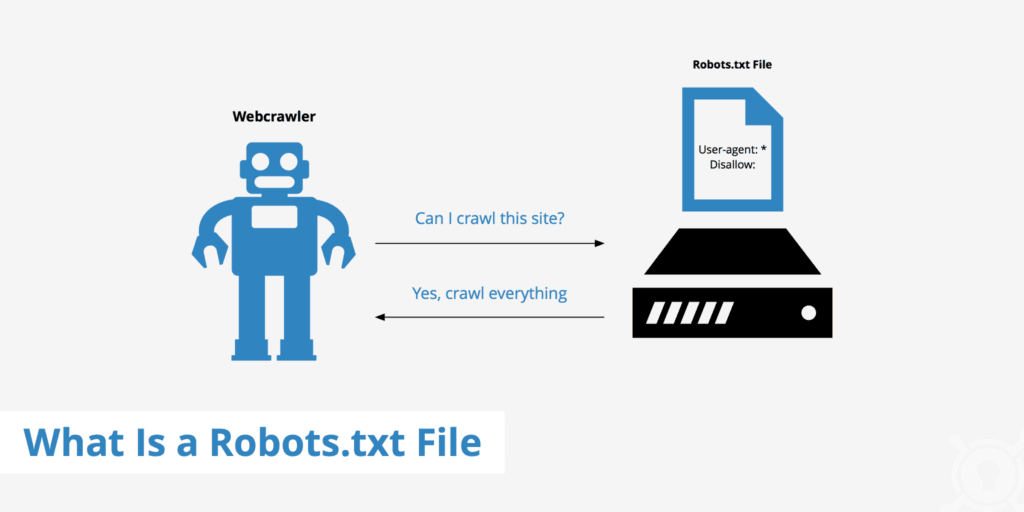
Robots.txt works like a simple rulebook for crawlers, telling them where to go and where to avoid. Keep it small and cache-friendly so bots get answers fast and servers stay responsive. Be explicit. Disallow private paths such as /wp-admin/, /cart/, and /my-account/. Allow access to core assets like JavaScript in /wp-includes/js/ so pages render the same way bots and people expect.
Different bots follow different rules, so separate blocks for GPTBot, CCBot, ClaudeWeb, and PerplexityBot help align bot behavior with site policy. User-agent entries set clear paths for full access, partial access, or strict limits.
Add a Sitemap directive and point to XML sitemaps for posts, products, images, and pages. Bots find structured URLs faster and skip unnecessary paths.
Blocking required CSS or JavaScript breaks rendering for crawlers and hides content signals. Many agents fetch above-the-fold styles to read layout and text correctly. Keep these resources open to match human view.
Crawl-delay rarely works because many AI systems ignore it. Control request rates on the server or with a web application firewall when throttling is needed.
Treat robots.txt like tracked configuration. Version it, review diffs, and watch logs. Spikes in 404s or odd access patterns point to typos, misconfigured bots, or security tools that shut out legitimate crawlers.
Add llms.txt to publish AI rules, permissions, and contact details
Websites are starting to use an llms.txt file to set ground rules for AI agents. It sits at /.well-known/llms.txt and tells automated readers what’s allowed, how fast to crawl, and who to contact for issues. Think of it as a short, plain guide made just for AI bots.
The file lays out which sections are open or blocked, rate limits for requests, and whether content may be summarized or quoted. It also states if citations are required. Contact info, like an email or help page, gives operators a clear path to report abuse or ask questions.
Licensing belongs in this file too. A site can declare Creative Commons terms or proprietary rights. Clear terms explain what’s allowed for model training versus what’s allowed for inference. Boundaries stay explicit, and misuse is easier to flag.
Add a pointer in robots.txt so crawlers discover llms.txt fast. Example: LLMs: https://yourdomain.com/.well-known/llms.txt. Many agents read robots.txt first, so this link helps them load the rules right away.
Keep syntax plain. Key:value lines and simple path lists are enough. Include metadata like publish date and version so agents know when something changed and avoid refetching old content. Serve llms.txt as a static file to prevent login prompts or redirects from breaking access.
Testing takes a few minutes with cURL. Check for HTTP 200 responses and cache headers set for public with a max-age near 86400 seconds. Review server logs to see if known AI agents fetch the file and whether they return after updates.
WordPress sites don’t need heavy custom work. Place the file under /.well-known in the site’s root if the host allows it. If not, a lightweight plugin for custom files or rewrites can serve llms.txt cleanly without theme edits.
Make content machine readable with schema, semantics, and pricing data
Search engines and other automated readers need clear signals, and Schema.org markup in JSON-LD gives them that clarity. Add Organization details so systems know who’s behind the site, WebSite schema for site structure, and BreadcrumbList to map navigation.
On product pages, include Product with Offer to expose price and availability. Add AggregateRating and Review to surface social proof many systems prioritize when selecting results.
Treat prices with care. Use structured fields like Offer.priceCurrency (USD) with Offer.price as a number so crawlers read exact costs. For frequent changes or promotions, set priceValidUntil or update timestamps to keep data current for both bots and shoppers.
Access rules need machine-readable cues. Meta robots directives such as noai or nosummary indicate exclusion from AI training or summarization on platforms that support them. Page-level robots rules back this up. Linking terms of service clarifies usage rights.
Specs belong in consistent tables or definition lists, not inside images. Images hide data from parsers unless alt text captures every detail, which rarely happens. For live stock on WooCommerce, reflect inventory in schema with Offer.availability, and use lastmod timestamps in sitemaps so agents see current status.
SEO plugins like Rank Math make this markup easier. They inject JSON-LD, flag conflicts, and reduce duplicate types that would confuse crawlers.
Language targeting matters. Hreflang points agents to the right locale version, essential for international catalogs. For WooCommerce products, include GTIN, MPN, and brand to sharpen entity recognition across search engines and knowledge graphs.
Monitor sitemaps and logs to track AI bot activity and performance
Search Console and Bing Webmaster Tools still matter for WordPress sites. Submitting primary and product sitemaps there speeds up discovery for both search engines and modern crawlers that read those feeds. Think of it as handing out a clear map so they find new pages fast.
Watch how often sitemap.xml and robots.txt get fetched. Sharp jumps often point to new crawlers showing up or an agent looping on your site with repeated requests. Those patterns warn of possible overload or abuse. Rate limiting helps before traffic swells into a problem.
User-agent logs help, but they don’t prove identity. Bots spoof names. Pair logs with IP checks and ASN lookups at the edge to verify who’s calling. Track common visitors like GPTBot, CCBot, ClaudeWeb, PerplexityBot, Applebot, and Amazonbot. Knowing who’s knocking lets teams shape responses per crawler.
Custom server metrics make the picture clearer than raw logs alone. Break down requests per minute by agent to see who’s most active. Watch 4xx and 5xx rates to spot crawlers that fail often or trip errors. Track average response times to catch slowdowns tied to scraping. Measure bytes sent to find heavy traffic that drives up hosting costs.
Security controls need a steady hand. WordPress security plugins and a WAF give fine-grained control over crawler access without hurting normal indexing. Keep allowlists for trusted agents, then block or throttle suspicious ones to protect resources. This keeps overzealous crawlers from hogging capacity while legitimate SEO bots index without friction.
Set alerts for odd behavior so issues get caught early. Non-browser user-agents poking at /checkout or firing many POST requests suggests automated testing or exploitation attempts. Contain those fast to prevent wider impact.
Write AI-friendly content that stays clear and useful for people
Clear headings act like signposts for people and AI, guiding them to the core of each section. Open pages with a one-sentence summary, then a short bullet list of key facts. Automated readers get context fast without wading through paragraphs, and visitors get an instant preview of what’s ahead.
Write in declarative sentences packed with specifics. Concrete details make content trustworthy and easy to parse. Use named entities such as company names, dates like product launch years, and quantities including measurements or prices. Say “over 10,000 customers as of 2023,” not “many users.” Include full URLs when citing sources so retrieval systems can verify information directly.
Step-by-step instructions work best as numbered lists. Clear sequences reduce confusion during paraphrasing or summarization by marking exact boundaries between actions. Keep numbering for procedures only, not for general points or features. Structure stays meaningful and avoids clutter.
Standardize labels across product pages. Use “Price,” “Shipping,” “Return Policy,” and “Warranty.” Familiar terms help AI map details into known schemas such as Schema.org’s Offer or Product types. Consistent labels mean shoppers asking about costs or returns get precise answers drawn from structured data.
Media needs careful treatment. Add alt text with concrete nouns and measurements, like “red cotton t-shirt size medium.” Provide captions and transcripts for videos that describe spoken content. Include metadata on duration and resolution in schema markup. Machines then understand visual and audio assets instead of skipping them.
SEO plugins such as Rank Math help manage titles and meta descriptions. Review outputs to catch duplicates or awkward phrasing that might confuse crawlers or mislead visitors about the page’s main topic. Tuning this layer keeps search engines aligned with the intended focus while staying readable.
WordPress sites benefit from targeted AI optimization plugins that automate structured data, media tagging, and related tasks. These tools bridge human clarity with machine-friendly structure and save time on routine work.
Enable safe programmatic checkout on WooCommerce with PayLayer
PayLayer acts like a bridge between AI agents and WordPress stores, including WooCommerce. It gives automated systems a clean way to work with carts, prices, discounts, stock, and checkout without changing how people shop on the site. Shoppers see the same storefront, and agents get consistent, structured access.
A locked-down API sits behind it. Only the pieces needed for AI-driven orders are exposed. Actions such as add-to-cart and checkout follow strict policies and authentication rules. These rules live in machine-readable formats so agents read pricing, rate limits, per-resource fees, and attribution requirements before sending requests. Less guesswork, fewer surprises.
Security stays front and center. Token-based auth scopes each agent to the exact tasks approved for them. Keys rotate on a schedule to shrink risk. Paid calls are logged with intent, item details, and amounts, which makes audits clear and refunds practical when issues pop up.
Sandbox mode removes risk during testing. Agents build carts, run through confirmations, and never trigger real shipments or charges. Teams tune flows without touching inventory or creating support work.
Error messages mean something here. PayLayer returns precise codes, including 402 Payment Required when funds are missing and 429 Too Many Requests when an agent pushes limits. Plain-language docs show how agents and developers should handle each case, so issues get resolved fast instead of dragging on.

Set AI access boundaries with robots.txt, llms.txt, and server controls
Robots.txt is a courtesy note for crawlers. It points to areas that are ok to visit and areas they should avoid. It’s advisory only and depends on well-behaved bots. Sensitive paths like admin panels or checkout pages need hard controls. Server-level authentication, IP allowlists, and firewall rules keep those routes protected regardless of any robots.txt line.
Llms.txt sits next to that file as a focused guide for automated readers. It outlines permissions for machine access, including pricing rules, rate limits, and contact details. It doesn’t enforce security. It sets expectations so AI systems understand proper access and behavior on a WordPress site without actually blocking requests.
Control at the page level lives in meta tags and headers like X-Robots-Tag. These give direct instructions: noindex to keep pages out of search, noai to exclude content from training datasets, nosnippet to turn off previews where supported. Some themes or plugins modify markup and headers, which can remove or change these directives. Routine checks confirm the tags reach the crawler unchanged.
Paywalled or permissioned content needs true gating. Full articles and product data stay behind authenticated endpoints via services such as PayLayer or standard logins. Summary metadata remains public under specified terms so discovery still works while premium details stay locked.
Clear policy signals help too. Citation guidelines ask automated readers to link to canonical URLs and include timestamps when quoting material. The same rules appear in llms.txt and in terms of service so expectations are consistent across touchpoints.
Regular audits keep everything aligned. Use crawlers configured to mirror popular AI agents. Verify only the intended paths are open, the correct pricing info displays, and policy notices appear where planned. Tune rules based on server logs and real traffic patterns. Access boundaries then track with shifts in bot behavior, not assumptions.
Use this practical checklist to make WordPress and WooCommerce AI-ready
Prepping a WordPress store for AI agents means setting firm tech rules while keeping pages fast and reliable for real people. Bots should move through clean URLs, read accurate data, and complete orders without tripping over policy gaps or slow pages. Policies need plain language. Schema should describe products and offers in detail. Checkout flows must be secure, predictable, and tested for automated orders.
Preparation Basics:
- Use stable permalinks with lowercase letters and hyphens
- Implement canonical tags consistently to avoid duplicates
- Structure pages with semantic HTML elements (nav, main, article)
- Hit fast server targets: TTFB under 200 ms, LCP within 2 seconds on mobile
- Keep XML sitemaps complete for posts, products, categories
- Configure robots.txt to block sensitive paths and allow essential assets
- Publish llms.txt in the well-known folder with clear AI access rules
- Validate schema markup often for accuracy and completeness
Content Quality:
- Open sections with short summaries, then list key facts in bullets
- Keep labels consistent across product details (Price, Shipping, Warranty)
- Make pricing and policies machine-readable with structured data
- Write sentences with concrete details like dates and company names
- Provide transcripts or captions for multimedia to aid parsing
- Link sources with full URLs for clean citations
Monitoring Setup:
- Submit all sitemaps to Google Search Console and Bing Webmaster Tools after updates
- Log visits from known AI user-agents, and cross-check IPs for authenticity
- Set alerts for spikes or repeated errors pointing to crawler issues or abuse
- Review monthly fetch frequency for robots.txt and llms.txt to confirm compliance
WooCommerce Readiness:
- Ensure Product/Offer schema shows current stock and correct live prices
- Keep checkout response under 10 seconds even under load
- Test API-driven cart adds and checkouts in sandbox mode before launch
Access Controls:
- Apply X-Robots-Tag at page level where exclusion from indexing or training is required
- Gate premium content with server-side authentication, not just robots.txt
- Document reuse terms and citation rules in llms.txt and terms of service
- Use IP and ASN filtering at the firewall to block spoofed or suspicious traffic
Ship changes in small batches. After each step, test with cURL and run schema and metadata validators. Watch server logs closely. Focus on error codes and odd patterns, not just total hits. Move to staging once logs, validators, and performance look clean.
When staging checks out, pilot PayLayer’s sandbox API flows to simulate agent purchases without touching real orders or stock. This staged rollout builds confidence. The site will serve people browsing and AI agents placing automated orders while maintaining strong security. Steady improvements with clear monitoring lead to an AI-ready store built on dependable operations, not guesswork.
Leave a Reply