

Human readers still matter, and traditional SEO still drives traffic, but the ground is shifting fast. AI assistants now pull answers straight from pages without visiting like a person would. No clicks. No ads. No credit sent back to the site.
These AI search bots work differently. They don’t skim headlines or snippets for ranking. They swallow whole articles, then craft replies that satisfy users inside chat windows or smart devices.
Picture a niche publisher with thousands of evergreen posts. During peak hours, nearly half their server reads might come from AI agents, yet almost none turn into real human sessions. The content fuels conversations elsewhere while leaving behind little revenue or insight for its creators. Websites pour effort into valuable material, then watch it vanish into invisible consumption.
So the challenge is clear. How do publishers let these bots read their work and still get something back? What if publishers charged AI search bots for access without shutting out genuine visitors or breaking classic SEO strategies?
This piece explores that middle ground. Content serves crawlers today and powers smarter agents tomorrow, while site owners keep control.
From blocking to billing with HTTP 402 and x402
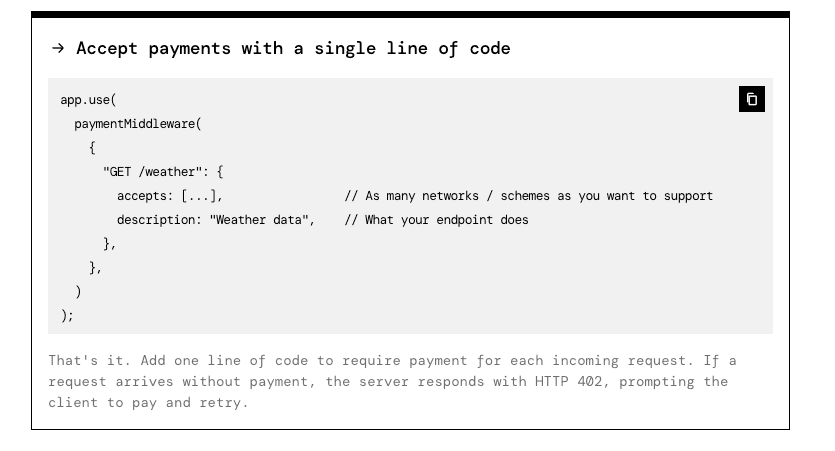
robots.txt is a polite request, not a lock. Many AI bots blow past it. Firewalls swing the other way and shove traffic out without checking intent. Helpful assistants get blocked, and publishers miss out on revenue.
HTTP 402 Payment Required offers a practical middle path. It tells clients to pay before access. Unlike 401 or 403, which deal with authentication and permissions, 402 makes the price signal explicit.
x402 builds on this. It’s an AI-focused payment protocol in HTTP headers. Server and bot trade terms up front, including price per article or per kilobyte, accepted currencies, and payment methods. The bot pays automatically, then retries with proof of purchase.
Publishers keep snippets or metadata open and charge for the full text. Access stays open to real readers, while automated clients fund the content they consume. Creators get paid without wrecking the browsing experience.
Flow looks like this:
- Bot requests a URL.
- Server replies with 402 and x402 headers listing price, payment endpoint, and time limits.
- Bot sends a programmatic payment based on those details.
- Bot retries the request with proof of payment.
- Server verifies and returns the full content.
How to set prices and control AI crawler access
Granular routing lets publishers choose exactly where to charge AI crawlers. No blanket fees across the whole site. Pick the sections that eat resources and carry the most value, like knowledge bases, docs, or deep product pages. High-value content sits behind paid access. General pages stay open for human visitors and search engines.
There are several pricing options that fit different goals:
- A flat fee per request, for example $0.01 per URL, keeps billing clear.
- Metered pricing bills by data transferred, like $0.10 per megabyte.
- Tiered bundles give bulk breaks, such as lower rates for 100 URLs a day.
- Timeboxed sessions sell crawl windows, for instance 10 minutes for $1, which suits exploration or tests.
Who’s asking matters. Heavy indexers pay more because they burn bandwidth. Research groups and academic crawlers get discounted rates after identity checks or payment history reviews. Signed bot identities enable those tailored prices without friction.
Fair use needs guardrails, and a few controls go a long way:
- Query-per-second limits stop any single bot from hammering servers.
- Daily spending caps per bot prevent runaway bills.
- Short-lived 402 nonces, about two minutes, shut down token reuse attacks.
- Partial previews replace full content when scraping looks shady, enough for a quick check without giving away the store.
WooCommerce stores should keep checkout and account pages off-limits to bots to protect sales and customer data. Rich product content – long descriptions, technical specs, compatibility charts – deserves gating so it’s not scraped for free. Keep price and availability visible to support SEO and real shoppers while the in-depth details earn their keep.
How payment headers enable x402 in WordPress without hurting SEO
WordPress sites using PayLayer send extra headers with an HTTP 402 response to tell AI crawlers how to pay. These headers list the price, the payment endpoint, the protected URL, the offer’s expiry time, and a unique nonce. Here’s an example:
HTTP/1.1 402 Payment Required x402-price: 0.01 USD x402-endpoint: https://paylayer.org/pay x402-resource: https://example.com/post/123 x402-expiry: 2026-07-15T10:00:00Z x402-nonce: 550e8400-e29b-41d4-a716-446655440000
The bot learns what access costs, where to send payment, which resource sits behind the paywall, when the offer expires, and it gets a nonce for security.
After paying at the listed endpoint, the bot requests the content again and adds an authorization header like: Authorization: X402 . The server checks the proof against the expected price and resource URL, confirms the nonce is valid and unused, and verifies policy alignment. Only after those checks does the server return a 200 status and deliver the full content.
Major search engines such as Googlebot and Bingbot still receive normal pages with no paywall. PayLayer bypasses payment for them based on reverse DNS checks or signed tokens confirmed in advance. Organic rankings stay stable while specialized AI retrieval bots meet the gate.
Everyday visitors in standard browsers, whether logged in or not, see the usual site. No 402 responses or x402 headers appear for them. Theme templates and caches keep running as they always do. Performance stays fast, errors don’t show up, and the human experience feels normal.
Detailed logs cover each step. A record appears when a 402 goes to an AI crawler, when a payment settles, and when full content gets served after validation. Logs tie user-agent strings to IP addresses and bytes sent. Publishers use this data to compare microtransaction revenue with ad metrics like RPM and CPM.
Getting started with PayLayer on WordPress and measuring revenue
Charging AI bots for scraping content adds a new revenue stream without disrupting human visitors or hurting SEO. PayLayer on WordPress makes it practical, giving site owners control over what to protect and what to leave open. The goal is simple: fair access and fair pay, so publishers get compensated for the invisible consumption behind AI assistants.
Getting started is simple:
- Install the PayLayer plugin on your WordPress site.
- Choose which routes or post types to protect with x402 payment headers.
- Turn on x402 in the plugin settings to enable pay-per-crawl.
- Run local tests with curl. First trigger a 402 response, then send payment proof and confirm full content delivery.
After setup, decide how payouts settle. Link stablecoin addresses, Lightning invoice endpoints, or other supported processors in PayLayer’s dashboard. Map currencies so reports line up with accounting records.
For WooCommerce, protect detailed product descriptions and specs while keeping prices and stock visible. Shoppers stay informed, and valuable data isn’t free to scrape. Keep checkout pages outside paywalls so sales continue. Confirm Googlebot receives normal 200 responses on product schema pages to preserve search visibility.
Pricing doesn’t need to be perfect on day one. Start with something like $0.01 per URL for bots. Review logs weekly to see who’s crawling, accepted rates, and average data per request. If certain crawlers pull heavy bandwidth, switch those to per-megabyte fees or session pricing for fairness and cost control.
Operational tips for PayLayer:
- Keep an allowlist of major search engines so they bypass charges.
- Rotate x402 signing keys every quarter to maintain security.
- Set nonce expiration around two minutes to block replay attacks.
- Track conversion rates from initial 402 responses to paid access. Treat this as the core KPI for monetization.
Follow these steps and publishers open up new settlement options for paid AI crawling while protecting user experience and organic traffic. Start small. Watch the data. Adjust pricing with intent. Turn unseen bot visits into revenue.
Leave a Reply